Don't Forget for ADHD
Most productivity apps assume you'll sit down with a list and work through it in order. With ADHD, days rarely go that way. Don't Forget doesn't try to stop you switching. It remembers what you were doing, so coming back is one tap instead of a blank stare.

Free · iPhone, iPad, Mac & Apple Watch · No account needed
Sound familiar?
- “You open a new tab to check one thing. Forty minutes later you can't remember what the first tab was for.”
- “You finally get into a task, a message arrives, and the task is gone from your head.”
- “You worked all day and have no idea where the time went.”
- “Your to-do list is so long that looking at it is the hardest part.”
Switching is one tap, not a lost afternoon
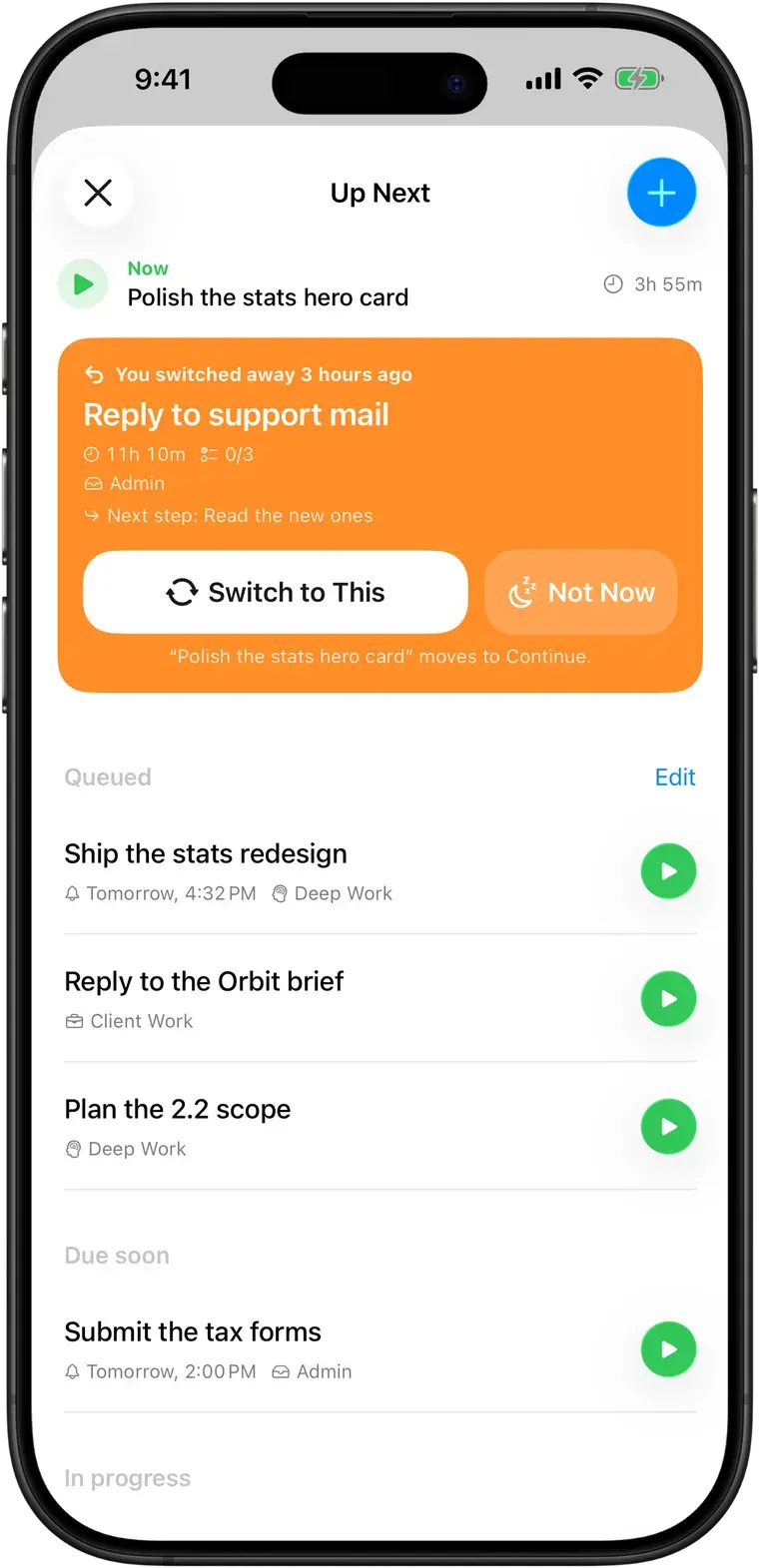
When something urgent pulls you away, tap Switch. The task you were on is parked with its time, steps and notes, and the new one starts timing. You don't have to write anything down or decide anything first.
A gentle nudge back
A minute after you switch, a notification asks: "Go back to this task?" Up Next keeps the task you left at the top, with how long ago you switched away and your next step, so you can pick up the thread instead of starting over.
Time you can see, for time blindness
The running task stays on your Lock Screen, in the Dynamic Island, on your wrist and in your Mac's menu bar. Statistics show how long things actually took, recorded from your real sessions, never estimated, which makes the next plan a little more realistic.
Small steps for big tasks
Break a task into steps and focus on just the one marked Now. Each step gets its own time, and when you come back to a parked task, the next step is waiting for you.
No streaks, no guilt
There are no streaks to break, no daily goals to miss and nothing that scolds you. Tasks you set aside wait in Up Next or Someday until you decide what to do with them.
- Someday holds ideas you want to keep without committing to them
- "Not now" snoozes a task until tomorrow
- Pomodoro is optional, so a timer never has to break your hyperfocus
Common questions
More in the full FAQ.
Is Don't Forget an ADHD treatment?
No. It's a productivity tool, not a medical device or therapy, and it doesn't diagnose or treat anything. Many people with ADHD use it alongside whatever support they already have.
Can it help with time blindness?
It can make time visible. The timer runs on your Lock Screen and Dynamic Island, and statistics show how long things actually took, measured rather than guessed. Many people find that helps them plan the next time more realistically.
Does Pomodoro work with ADHD?
For some people, some of the time. Short sessions can make starting easier, but a timer that rings in the middle of hyperfocus can also break a good run. Don't Forget lets you choose: run an open-ended timer, or turn on Pomodoro with 15, 25 or 50-minute sessions and 5 or 10-minute breaks.
Studying with ADHDIs Don't Forget free?
Yes. Tasks, the timer, switching, steps, Up Next, Pomodoro, reminders, folders, widgets, the Mac menu bar app, the Apple Watch app, iCloud sync and your daily, weekly and monthly statistics are all free. Don't Forget Pro is an optional one-time purchase ($19.99 in the US; the App Store shows your local price).
Next time you get pulled away, you'll know where you were.
Free on iPhone, iPad, Mac and Apple Watch. No account, no subscription.